产品详情页的没库存的产品的选项卡隐藏
简述:{%- style -%}.radio__button .sold-out+label:before{ cursor: not-allowed; /* 禁用点击 */ opacity: 0.5; /* 显示为透明 */}/* 禁用的 radio 按钮样式 */.radio__inputs span.radio__button label.disabled { color: #999; /* 禁用状态颜色 */ cursor: not-allowed; /* 禁止点击的鼠标指针 */ text-decoration: none; /* 禁用状态下去掉下划线 */}.radio__inputs span.radio__button label.disabled::before { content: ''; /* 禁用状态下不显示 ::before */}{%- endstyle -%}<script> document.addEventListener("DOM...
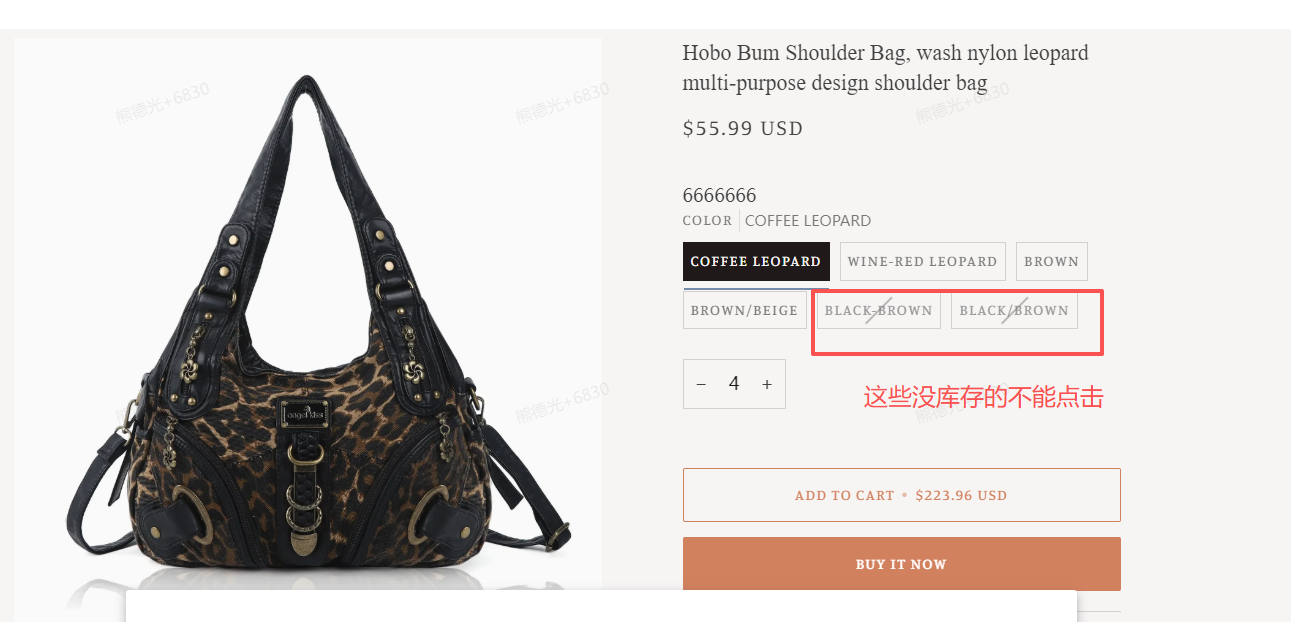
{%- style -%}
.radio__button .sold-out+label:before{
cursor: not-allowed; /* 禁用点击 */
opacity: 0.5; /* 显示为透明 */
}
/* 禁用的 radio 按钮样式 */
.radio__inputs span.radio__button label.disabled {
color: #999; /* 禁用状态颜色 */
cursor: not-allowed; /* 禁止点击的鼠标指针 */
text-decoration: none; /* 禁用状态下去掉下划线 */
}
.radio__inputs span.radio__button label.disabled::before {
content: ''; /* 禁用状态下不显示 ::before */
}
{%- endstyle -%}
<script>
document.addEventListener("DOMContentLoaded", function() {
// 遍历所有的 .radio__button 元素
const radioButtons = document.querySelectorAll('.radio__inputs span.radio__button label');
radioButtons.forEach(label => {
// 检查 label 是否有 ::before 伪元素
const beforeContent = window.getComputedStyle(label, '::before').getPropertyValue('content');
// 如果 ::before 伪元素的内容为空或是特定的禁用标记(例如:'—'),则禁用相应的 radio 按钮
if (beforeContent !== 'none' && beforeContent !== 'normal') {
// 找到对应的 radio input
const input = label.previousElementSibling;
if (input && input.type === 'radio') {
// 禁用 radio 按钮
input.disabled = true;
// 禁用后,可以给 label 添加视觉反馈(如禁用样式)
label.classList.add('disabled');
}
}
});
});
</script>

